

Finish the match.The highlights are already cut.
KeroCam is a free, ad-free highlight recorder for your games. It starts recording when you play and cuts your kills, multikills, chicken dinners and wins into clips on its own. Pick a song and it cuts them into one video on the beat.
Free, open source, no account
Supported games
Each game gets the most accurate way to find its highlights, and the library, stats and settings are kept separate per game.
PUBG
SupportedReads the kill and knock prompts on screen while recording. Add a free PUBG API key and regular matches also get precise kill data from PUBG.
- Clips
- Kills, knocks, getting knocked, getting eliminated, chicken dinners
- Per match
- Map, placement, damage, weapon, distance, headshots
- Needs
- PUBG on Steam, with the game in Simplified or Traditional Chinese and the default HUD
League of Legends
SupportedReads the live data the game itself provides, so there's no screen reading and no API key. Recording starts when you load into a match.
- Clips
- Kills, double to penta kills, first blood, aces, dragons, heralds and barons (steals are marked), the win or loss
- Per match
- Champion, KDA, CS, damage, gold and the full scoreboard
- Needs
- The Riot client, any server except the Chinese WeGame client. Replays and spectating aren't recorded
More games
More games are on the way. Tell us on GitHub which one you'd like KeroCam to support next.
Suggest a game
What it does once it's installed
Most of the time you won't open it. Play, then come back to clips that are already cut.
- Kills
- 0
- Knocks
- 0
0 highlights cut
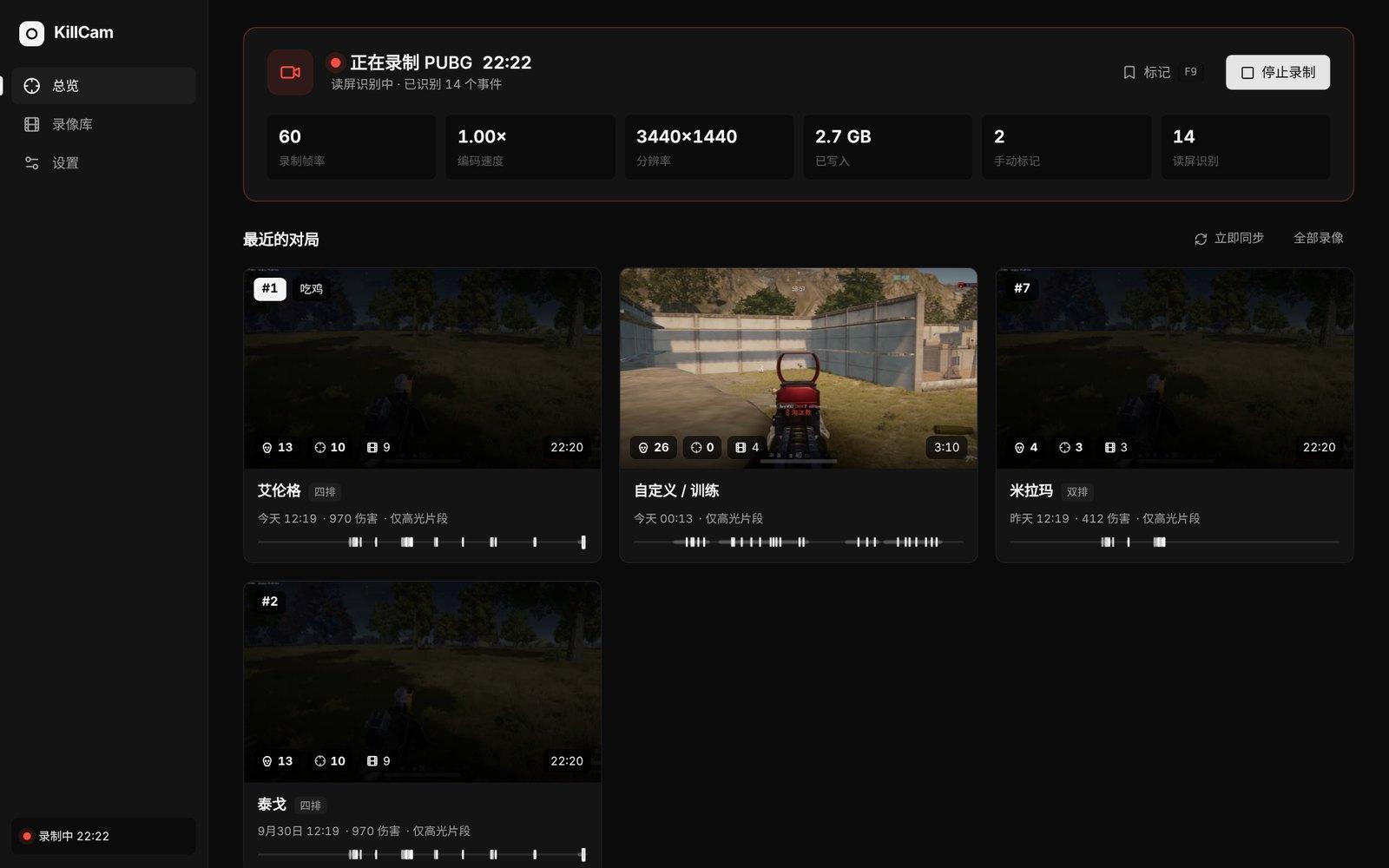
Records on its own
Waits in the tray. Starts recording when PUBG opens or a League match loads, and stops when you're done.
Cut as soon as the match ends
No need to close the game. When a match ends, its highlights are cut in the background and waiting in the lobby or client.
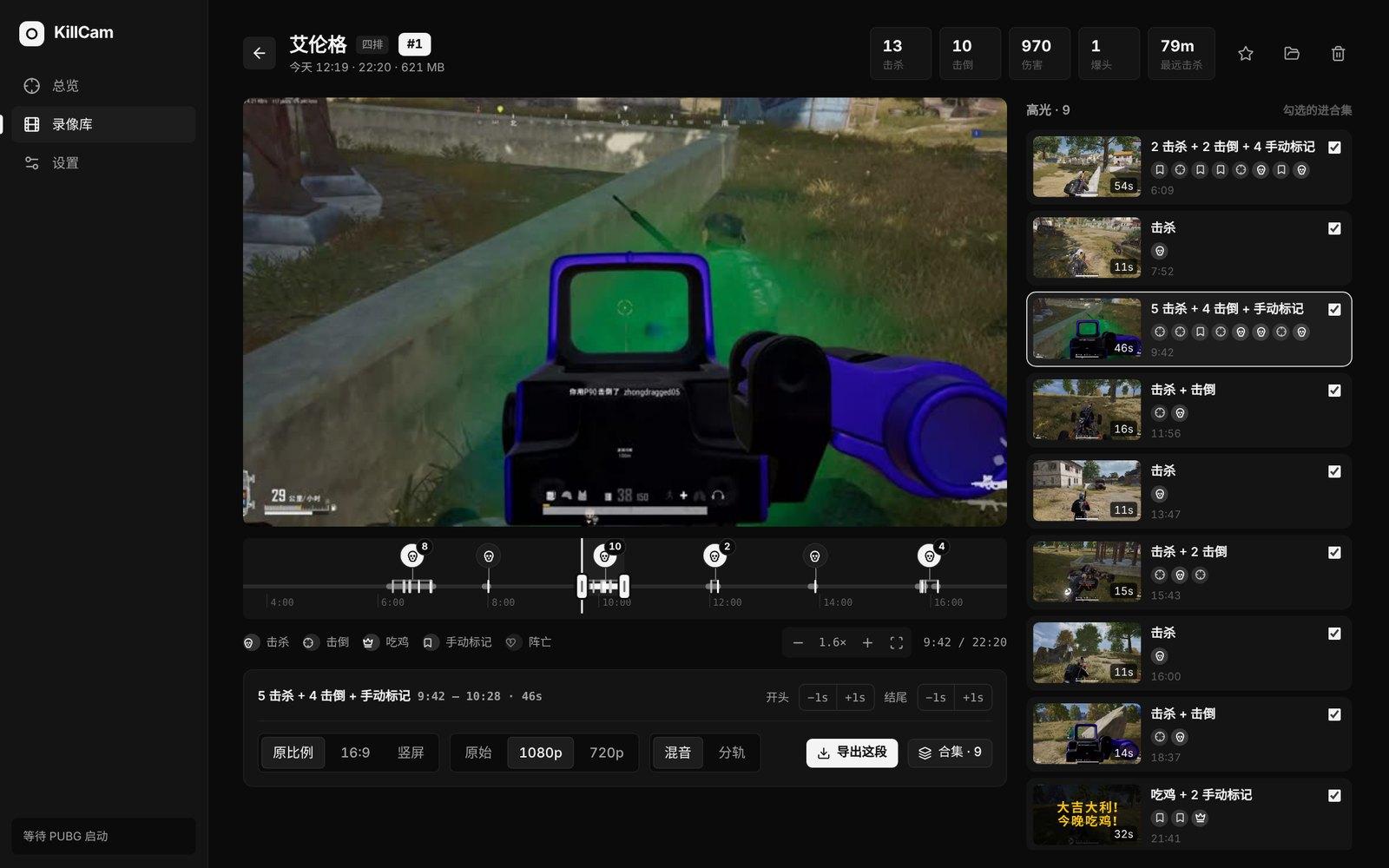
Whole-match timeline
Every event sits on one zoomable timeline; click anywhere to jump there. Kills that pile up are grouped, and one click zooms in.
Route and fights map
For regular PUBG matches, your drop, your route and every knock, kill, knock taken and death are drawn on the full-resolution map. Click one to jump to that moment in the recording.
Separate audio tracks
Game audio and your mic are recorded on separate tracks. Export them mixed or split for editing.
F9 to keep a moment
Did something worth keeping? Press F9 and that moment stays.
Your stats
K/D, damage and win rate for PUBG, with every weapon's record and kill distances; win rate, KDA, CS and top champions for League. Each game on its own page.
Keeps your drive in check
Keep only the highlights and drop full recordings once they're processed. Old recordings are re-encoded to AV1 on the GPU while you're not playing, about half the size (RTX 40 series or newer). Past your size limit, the oldest are cleared; favourites stay.
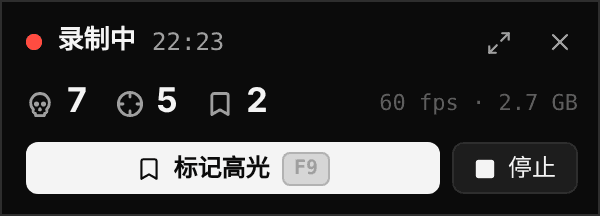
In-game mini window
Shows recording time and kills detected. It never shows up in your recordings.
Pick a song. One click cuts it.
The edit page finds the song's beat, bars and drop, takes the fights with the most kills and knocks from your latest matches and lays them out on the music. No ordering clips, no lining up cuts frame by frame.
Miramar · Kar98k, 250 m, headshotBefore the drop: earlier fights, in the order they happened
A kill, on the beat
- The fight with the most kills lands its first kill right on the drop
- Every fight stays whole, never cut before its last kill or knock
- Cuts on the beat, the end on a bar line, and no footage used twice
- Transitions (flash or black) only where the match changes; hard cuts everywhere else
- On the biggest late fight the music steps back to the gunfire and slams back in on the last kill
Rather cut it yourself?
A real timeline: media on the left, preview in the middle, settings on the right, picture and music tracks below. Drag edges to trim and clips to move, S to split, Ctrl+Z to undo, and Cut the waiting drops the dead time between kills. The preview is the export's shape (original, 16:9 or vertical); anything under 120 fps can be interpolated to 120, or squeezed under 10, 25 or 50 MB to send straight away.
Use your own song (mp3, m4a, wav, flac and so on). No music comes with KeroCam, so mind the rights when you post.
Every match, on the record
KeroCam keeps each match's data on your PC and sums it up on the Stats page, one game at a time.
- Last 20, last 50 or every match, one click apart
- Match by match, with wins marked
- PUBG: K/D, damage, top 10 and headshot rates, win rate and damage on each map
- Every weapon's kills, knocks, headshot rate and range, your kill distances, and who you kill most and who kills you most
- League: win rate, KDA, CS per minute, multikills and top champions
PUBG stats need a free API key from developer.pubg.com (the setup walks you through it); arcade and custom matches aren't counted. League uses the game's own data, no key needed.
- Matches
- 202 wins · 10% win rate
- Kills per match
- 3.163 kills · 57 knocks
- K/D
- 3.5018 deaths
- Damage per match
- 4539,066 total
- Top 10 rate
- 70%14 top-10 finishes
- Headshot rate
- 27%17 headshot kills
Kills per match
Win
Top weapons
- Beryl M76221avg 41 m · 4 headshots
- M41617avg 58 m · 3 headshots
- Kar98k9avg 190 m · 4 headshots
- ACE328avg 48 m · 2 headshots
Install
Download the installer
Use the download button above, or grab KeroCam_x.x.x_x64-setup.exe from GitHub Releases.
Run it
No admin rights needed. FFmpeg is bundled, so there's nothing else to install.
If Windows blocks it
Click “More info”, then “Run anyway”. KeroCam is a free personal project without a paid Microsoft code-signing certificate. All the source code is public on GitHub if you'd like to check it.
Follow the setup
The first launch walks you through display, quality, audio sources and where to save recordings, then runs a quick test to make sure you don't drop frames.
New versions show up inside KeroCam. One click installs them; you won't need to come back here.
Windows protected your PC
Microsoft Defender SmartScreen prevented an unrecognized app from starting. Running this app might put your PC at risk.
1More info
Windows protected your PC
Requirements
- System
- Windows 10 (2004 or later) or Windows 11, 64-bit
- Graphics
- NVIDIA GPU with NVENC (GTX 10 series or newer). AMD may work but hasn't been tested. Compressing old recordings to AV1 needs an RTX 40 series or newer
- PUBG
- On Steam. Screen detection needs the game in Simplified or Traditional Chinese and the default HUD, for now
- League of Legends
- The Riot client, any server except the Chinese WeGame client
- App language
- English or Chinese, switch any time in Settings
Your recordings stay on your PC
Nothing is uploaded
Recordings, screenshots and settings stay on your own PC. KeroCam has no server and collects no usage data.
Only a few connections
PUBG's official API to look up your own matches when you add a key; each map image from PUBG's official api-assets repository the first time a route is drawn on it; League champion portraits. Anything downloaded is kept on your PC. And GitHub Releases, to check for updates.
Hands off the game
No injection, no reading or writing game memory, no changes to game files.
Open source
All of the code is on GitHub under the MIT license. Read it or build it yourself.
FAQ
Can this get me banned?
KeroCam doesn't inject into the game, read or write game memory, or change any game files. It records the same way OBS display capture does: Windows' own screen duplication for video, Windows audio APIs for sound. For PUBG it reads the log files the game writes locally and PUBG's public API. For League it reads the data the game serves on your own PC: during a match, the live data Riot opens to third-party tools, and at the end, the match stats from the client. All of it is read-only. That said, only the game's publisher decides what anti-cheat allows, so no one can guarantee it.
Will it cost me frames?
Recording uses a little GPU, about the same as OBS display capture. Encoding runs on the GPU's separate NVENC chip, not the part rendering your game, and cutting highlights only copies video data, at the lowest priority. If frames are tight, drop the recording frame rate from 60 to 30 in Settings → Quality.
Do I need a PUBG API key?
No. Without one, KeroCam still finds kills, knocks, deaths and wins from the screen and cuts highlights. With one, regular matches also get map, placement, damage, weapon, distance and headshots, with more precise timing. Keys are free at developer.pubg.com, and the setup shows you how.
How soon are my highlights ready?
You don't need to close the game. When a match ends, its highlights are cut in the background and waiting when you're back in the lobby or client. Cutting only copies video data without re-encoding, at the lowest priority, so it doesn't affect the game. In PUBG with an API key, regular matches are cut from screen detection first; when the official data arrives a few minutes later, map, placement, damage and kill details are filled in automatically.
Do I bring my own music for the one-click cut?
Yes. Use your own songs; common formats like mp3, m4a, wav and flac all work. No music comes with KeroCam, so mind the rights when you post. Once you pick a song, its beat and drop are found for you, and you choose 30 seconds, a minute or the whole song. The clips can come from your latest matches in one click (only fights with kills or knocks, never the chicken dinner screen), or you can pick them in the library.
Does compressing old recordings hurt the quality?
Hardly noticeably. Recordings older than 14 days (or 7 or 30, if you change it) are re-encoded to AV1 on the GPU while you're not playing, usually at about half the size. The original is only replaced once the new file checks out complete and actually smaller, and it pauses the moment you start a game or a recording. It needs an NVIDIA GPU with AV1 encoding (RTX 40 series or newer), and Settings shows how much has been compressed and how much space it saved.
I can't see the mini window, or it covers the game
Use borderless windowed mode so the mini window can sit on top of the game; in fullscreen the game covers it. With a second monitor you can drag it there and it remembers the spot. Turn it off under Settings → Startup & in-game if you don't need it.
Where are recordings and settings stored? How do I uninstall?
Recordings go to the folder you chose during setup, and settings live in %APPDATA%\com.jkeroro.killcam. Uninstall from Windows Settings → Apps. Your recordings folder is left alone; delete it yourself if you want.
Install it before your next match.
Setup takes a minute, and the first launch walks you through everything.